Face swap for long videos
Working on a full scene or a longer recording? Open it in ClapClip on Windows, choose the replacement face, and check a few sections before exporting the video on your PC.
Free download. Export requires a purchase inside the app.
Check the difficult shots first
Start with a section where the person turns, walks out of frame, or passes behind another person. Review the eyes, mouth and face edges. A good result on the opening frame does not tell you how the rest of the video will look.
Process the video on your PC
The desktop app processes your footage locally. You do not need to upload the full recording to a browser service. Leave room on your drive for the exported file; processing time depends on video length, resolution and your GPU.
Preview before paying for an export
Download the Windows app and try the preview with your footage. Desktop export requires an in-app purchase. Check the price in the app before starting a full export.
- Local video processing on Windows 10 and 11
- Preview selected sections before export
- GPU acceleration on supported hardware
Look closely before you export
Choose a clear face photo. In the preview, check where the person turns their head or covers their face. Look for uneven lighting and rough edges. Results and speed depend on the footage and your PC.
Free download. Export requires a purchase inside the app.
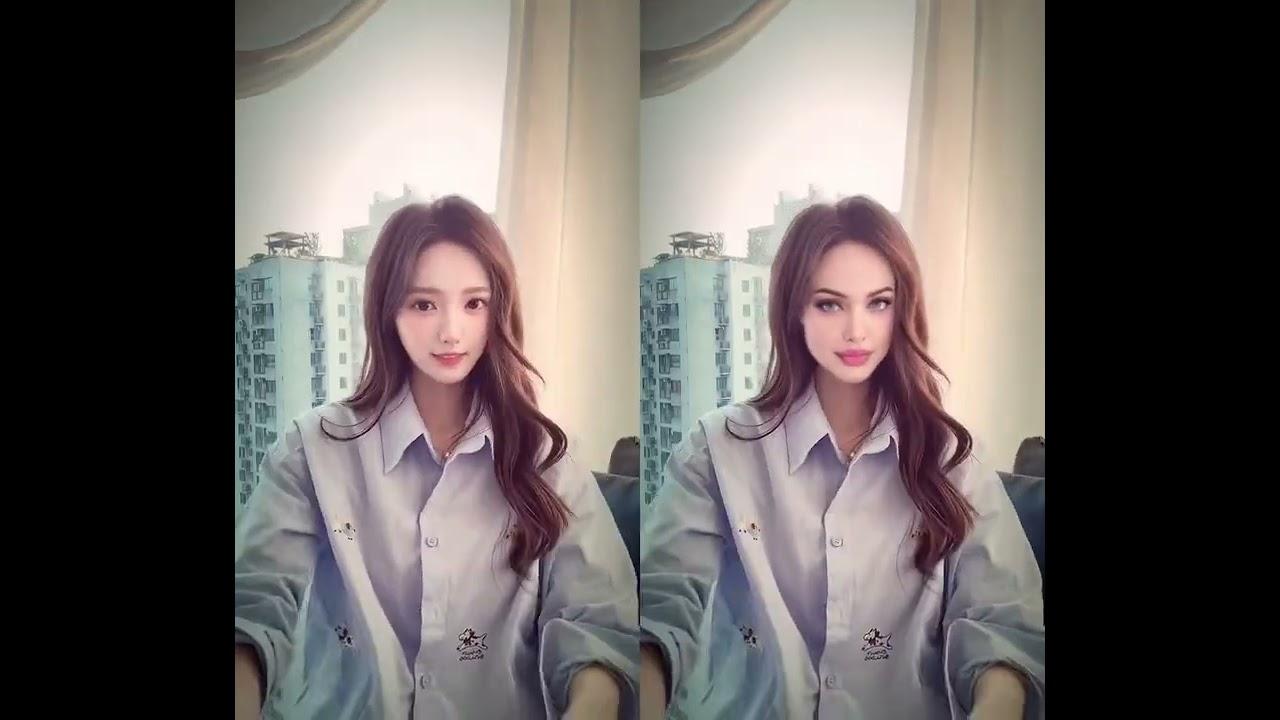
Video currently unavailable. This is a saved preview image, not a playable video.
Video currently unavailable. This is a saved preview image, not a playable video.
Watch the full before and afterFAQ
Can I process a long video without uploading it?
Yes. Use the Windows desktop app. The online tool on this website handles photos; video processing takes place on your PC.
How long will the export take?
It depends on the clip, output resolution, settings and GPU. Try a short section from the same video first to get a useful estimate for your computer.
Is long video face swap free?
The app is free to download. You can inspect the preview before buying an export inside the app.
Create with permission. Use media and faces you have rights to, and clearly disclose edited content.
What do you want to edit?
Video face swap
Change the face in a video with the Windows app.
See the resultsPhoto face swap
Open a photo in the Windows app and add the face you want to use.
See the resultsBatch processing
Use one face across several photos or videos in the Windows app.
See the resultsLocal processing
Process photos and videos on your Windows PC without uploading them.
See the resultsEdit videos on your Windows PC
Free download. Export requires a purchase inside the app.