Free online photo face swap
Free Online Face Swap
Swap faces online with ClapClip. Add a photo to edit and a photo of the face to use, then preview and download the result on your phone or computer.
More than one person?Try multiple face swapInteraction preview
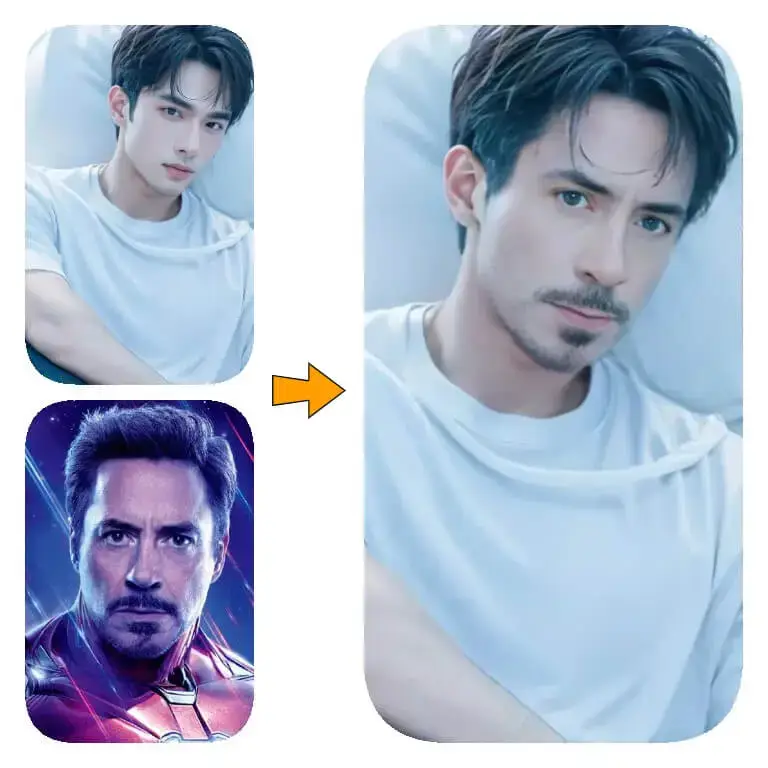
Batch face swaps for photos and videos
- Batch processing
- Real-time preview
- GPU acceleration
- Local & private
ClapClip for Windows keeps your files on your PC. No cloud uploads.
Use it on your phone or computer
Open faceswap.free in Safari, Chrome or another modern browser. Upload photos from your phone or computer; there is no mobile app to install.
Which photos should I use?
Choose a sharp, well-lit photo of the face you want to use. Blurry faces and heavy shadows can affect the result. Zoom in on the eyes and jaw before downloading.
Free to use, no sign-in
Swap faces in photos for free, with no limit on the number of swaps. No account or sign-in is required.
What do you want to edit?
FeaturesVideo face swap
Change the face in a video with the Windows app.
See the resultsPhoto face swap
Open a photo in the Windows app and add the face you want to use.
See the resultsBatch processing
Use one face across several photos or videos in the Windows app.
See the resultsLocal processing
Process photos and videos on your Windows PC without uploading them.
See the resultsSee the results
More examples
Video currently unavailable. This is a saved preview image, not a playable video.

Video currently unavailable. This is a saved preview image, not a playable video.

Video currently unavailable. This is a saved preview image, not a playable video.
Video currently unavailable. This is a saved preview image, not a playable video.
Windows 10 / 11
How to swap faces in the Windows app
Choose a clear face photo. In the preview, check where the person turns their head or covers their face. Look for uneven lighting and rough edges. Results and speed depend on the footage and your PC.
Free download. Export requires a purchase inside the app.
Import your video
Open a video or photo directly from your PC.
Select a face or template
Pick a clear source face or a built-in template.
Preview in real time
Watch the swap update live as you adjust.
Export video
Export on your PC using GPU acceleration. Exporting requires an in-app purchase.
Guides & tutorials
Guides & tutorialsFree Online Face Swap Models: Which One Should You Use?
Compare Baseline, Robust, Balanced and Accurate face swap models, their 128px and 256px crops, and the Edge blur and Fusion area settings.
AIFaceSwap.io Alternative: Photo Tool vs Windows App
Compare a free browser photo tool with a local Windows app for face swaps. Check file limits, video support and export terms before you choose.
Offline Face Swap Apps for PC: How to Choose
Choose offline face swap software for PC by checking local processing, file limits, setup, preview and export terms before you install.
Frequently Asked Questions
FAQHow do I swap faces in a photo?
Add the photo you want to edit, then a clear photo of the replacement face. Start the swap and check the result before downloading it.
Can I use face swap for free on my phone?
Yes. Photo face swaps are free on iPhone, Android and computers, with no sign-in and no limit on the number of swaps.
Are my photos processed online or on my device?
This website sends images or face crops to a server. Files and results may be kept for processing and recovery. Sharing to the gallery is optional. The separate Windows app processes photos and videos on your PC.
Can I swap faces in videos here?
The online tool is for photos. For video and batch face swaps, use ClapClip for Windows 10 or 11. The desktop app is free to download; exporting requires an in-app purchase.
Edit videos on your Windows PC
Free download. Export requires a purchase inside the app.